


LiftTrace is a self-hosted weightlifting tracker (Docker + Android, AGPL-3.0). rc.5 is the next public roll-up, bundling everything since the rc.4 release.
What’s new
Scheduled automatic backups. Settings → Backup → Schedule lets you pick a time + frequency (daily / weekly). Server installs get an admin UI with optional ENV lock for managed deployments; the Android app does the same for offline-only users, writing scheduled backups to device storage or the share sheet.
Multi-architecture Docker image. The public image at ghcr.io/traceapps/lifttrace now ships both amd64 and arm64 builds, so Raspberry Pi 4 / 5 and other ARM self-hosters can docker compose up -d without building from source.
Default session length raised. From 30 days to 1 year so PWA users stop getting signed out every month. Admins can still set their own session length under Settings → User Management → Session Length.
Better biometric failure path on Android. When a stored auth token has expired, biometric sign-in now surfaces a clear “Session Expired” prompt instead of silently bouncing back to the Login screen with no explanation.
Fixes
INSECURE_COOKIESis now called out inline in the exampledocker-compose.ymlwith a comment explaining the failure mode (every request 401s after a successful login because the browser drops theSecurecookie over plain HTTP); README troubleshooting entry expanded with the exact Firefox console message that confirms the diagnosis (#4)- Sync pulls no longer clobber local pending edits. An incoming server pull respects in-flight local changes instead of overwriting them with older data.
- Sync now clears local auth state on a 401 response so the user gets prompted to sign in again, instead of the app looping silently on every subsequent request.
Install / upgrade
- Docker: pull the new image and restart your stack (see the README for compose snippets)
- Android: signed APK on the release page
- Full CHANGELOG: main repo
What is LiftTrace?
Self-hosted weightlifting tracker. Diary (sets, reps, weights, RPE, supersets, warm-ups, persistent rest timer, natural-language Smart Add), Programs (mesocycles, templates, week-by-week progression), Exercises (full library from wger / free-exercise-db / exercisedb plus your own custom entries with images, GIFs, or YouTube links), Statistics (volume, PRs, frequency, body stats trends, RPE overlays), Coaching (trainer prescribes workouts to athletes, per-set feedback, two-way reply threads), AI assistant (Claude / OpenAI / Gemini / Ollama, BYOK, opt-in), built-in music player (Subsonic / Jellyfin / Plex / Emby libraries plus Icecast / Shoutcast / HLS streaming stations with lockscreen controls), OIDC SSO (Authentik, Keycloak, Pocket ID, Authelia, Auth0, Google, anything OIDC 1.0), workout import from Strong / Hevy / FitNotes / Jefit CSVs, federation with NutriTrace (auto-log workout calories burned to your NT diary). Docker on the server, Capacitor app on Android. AGPL-3.0 licensed.
I have put in zero effort to figure out the issues btw, just first run stuff that I’m seeing:
From the logs:
lifttrace  | [2026-06-26T19:30:58.039Z] [INFO ] [seed] Seeded 3 starter program templates
lifttrace  | [2026-06-26T19:30:58.040Z] [INFO ] [exercise-sources] Library is empty — auto-seeding: wger, free-db
lifttrace  | [2026-06-26T19:30:58.040Z] [INFO ] [exercise-sources] Importing from wger…
lifttrace  | [2026-06-26T19:30:58.107Z] [INFO ] [scheduler] Starting 15-minute tick loop
lifttrace  | [2026-06-26T19:30:58.111Z] [INFO ] LiftTrace running on port 3003
lifttrace  | [2026-06-26T19:31:00.419Z] [INFO ] [exercise-sources] wger: imported 858
lifttrace  | [2026-06-26T19:31:00.419Z] [INFO ] [exercise-sources] Importing from free-db…
lifttrace  | [2026-06-26T19:31:00.606Z] [INFO ] [free-db] processed 873, inserted 873
lifttrace  | [2026-06-26T19:31:00.606Z] [INFO ] [exercise-sources] free-db: imported 873
I then opened and ran through the initial config, setting my username up as the first account, and logged in.
Once there, every time I switch a context to exercises, settings, etc, I see a “Not Authenticated” popup despite showing as logged in, and having just logged in with the newly created user moments before. Also, the exercise database is empty, along with no programs. I would assume this has to do with the authentication issue, but again I haven’t dug into it at all.
Edit: Odd, I shut it down, checked the configs (but made no changes), and logged back in - exercises were loading and the “Not Authorized” toast stopped appearing.
Local DNS redirects to local NPM for my test vlan, which is pointing to the container host - to share the setup.
Edit 2: Also the Exercises graphic draws on top of the Exercises text, and becomes unreadbale on mobile. It just reads as “rcises”.
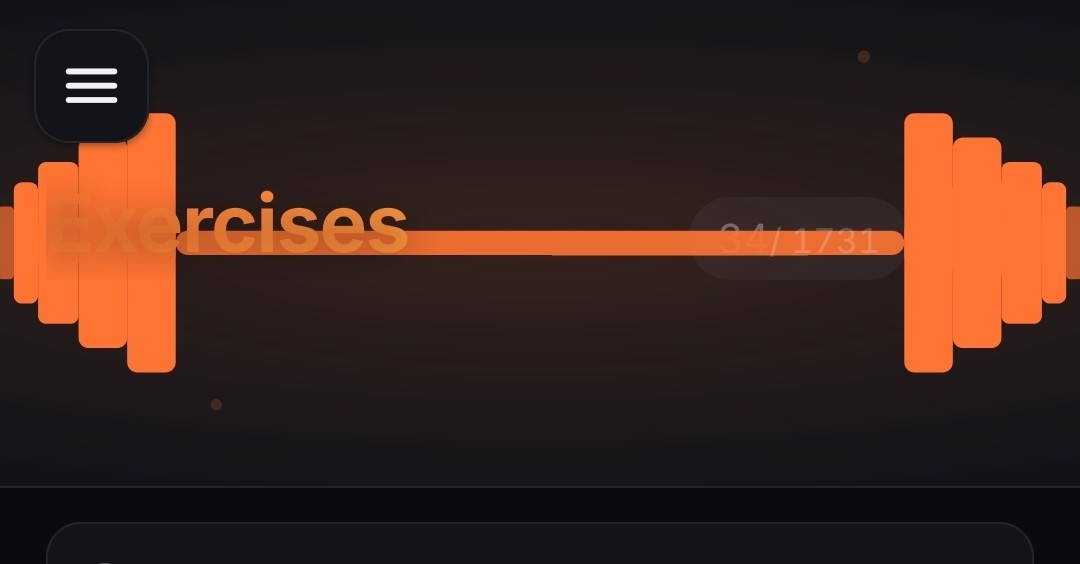
Apparently my last edit didnt stick around - I also didnt see the add button or the qty of exercises until I looked on the desktop.
Thanks for highlighting the above:
Banner overlapping the H1 (“rcises”). This one I’m fixing structurally. The illustrated SVG banners across LiftTrace (and my other 2 Trace apps) are getting removed entirely. They were the single biggest source of layout fragility across viewport sizes, plus they were doing the project no favors aesthetically. In their place: the existing compact Gradient header stays as-is, and the “Animated” option becomes a subtly animated version of the same compact gradient (slow accent-hue drift, same height, no overlapping content). Three modes total: Animated, Gradient, Off, all sharing the same compact-header geometry. That removes a whole category of bugs and trims a real chunk of bespoke SVG maintenance.
Until that is released, you can flip your view to Settings → Appearance → Page Banners → Gradient (or Off) and the overlap should go away immediately.
Add button + exercise count missing on mobile. Real bug, haven’t pinned down the CSS yet but I’ll find it. The Exercises page action bar isn’t wrapping or relocating correctly at narrow widths.
Thanks again for bringing these to my attention.
should now be addressed in latest RC6.
I like the differentiation, but yeah it is going to make things much more complicated. Maybe icon color/theme color set per category for the same (but much easier) level of visible differentiation?
To be clear the add button and count are present, just hidden by the svg in the banner.
Right now creating some json of exercises I do to test import, manual creation after that, and (as long as the kids cooperate) I’ll get a workout in for a test too
Ok, I’ve got some utility/usability comments:
Exercise Creation:
- Both options (manually creating and json import) work without issue
- It may be handy to create some kind of per-exercise export specifically to be shared to others. I’m thinking since its just json it could live in a repo on a per exercise basis, right next to the app itself (not necessarily the same repo).
- It would be good to have an option to either add your own equipment type or allow a searchable tag. I sometimes make a workout on the fly based on whats available at the gym (like if I’m traveling), and this would help for quick searches. I also have some equipment here at home that I use that would be handy to include or exclude (like if my kids are using the slackboard).
Workout:
- The overall timer is good, but a per exercise timer inside that would be great along with a settable rest time. If I’m doing 2 minutes of weighted carries for example, I’d want to start the timer, get a countdown, then get a beep or something when the timer hits. That should be settable for the exercise.
- For a settable rest timer, if the exercise itself has a timer, then a “rest” could just be an exercise with a custom timer. This would be per rest settable, not overall. For example, if I’m doing an HIIT circuit I may want a 20s rest between exercises, but then at the end I may want a 2 minute timer to run before starting another round.
- Ideally I’d want to also grab HR data off my chest strap sensor, whether I’m getting it in-app during the session or after. I’ve made a couple of apps to pull that data in (entirely different purpose btw), its not too bad for devices like polar with a clean api, but you could also do something with an import possibly. It would be that or the other way around, allow the session data to be available for export, which would be drastically easier as a PWA. Since this is more structured indoor training/logging, a timestamped csv is probably best, though json would be fine too.
I know you’re not looking to add features in when you’re at RC, just some general feedback on what I like to see/do
Genuinely useful feedback, thanks for taking the time. Walking through each:
Per-exercise sharing. Real gap. The exercises table is already structured cleanly enough to dump one as JSON; adding a “share this exercise” button that produces an importable file is small. The community-repo idea is good too: a separate
awesome-lifttrace-exercisesrepo where people can drop contributions, and the in-app importer can read from a URL. Going on the roadmap.Custom equipment + searchable tags. The schema already supports arbitrary equipment strings; the UI just defaults to a fixed list. Adding a “+” in the equipment picker plus a “what’s available today” filter chip set on the Exercises page is genuinely useful, especially for travel and home-gym use. Adding to the roadmap as a near-term candidate.
Per-exercise timer for time-based work. Real gap. The rest timer infrastructure exists but doesn’t currently cover “do this exercise for N seconds with a countdown and a cue.” That’s a meaningful addition for anyone doing carries, planks, isometrics, hangs, or hybrid stuff. Sharing the same audio + haptic plumbing as the rest timer keeps it cheap. Roadmapped.
Per-set / per-round rest in HIIT-style circuits. Currently rest is global with per-exercise memory, which doesn’t cover the “20s between reps, 2 minutes between rounds” pattern you described. That’s a structural change to how sets express rest. Going on the list to think through together with the time-based timer above, since they share infra.
Heart-rate data. The export direction you called out is the cheap win, and you’re right that PWA makes it easy. I’ll push a CSV export of the completed workout (sets, reps, weights, RPE, timestamps, rest durations) in a near term RC. That covers anyone who wants to feed an external analysis pipeline. Live HR ingestion from a BLE chest strap is the heavier direction and goes on the roadmap.
Thanks again for your valuable feedback. Appreciate the level of detail.
@TraceApps@lemmy.world not an official rule (yet), but common request - if you used AI in development, it would be good to disclose the ways in which it was used.
Such as generating docs, working an API, fully generated, a specific feature with human oversight/rewrite, etc.
I’d encourage you to put it in the post as well and not just as a reply
Welcome back OP! Did you just add RPi support or did I miss that last go 'round?
just added. Was a request for my other NutriTrace App so made sure to add it here as well.
Nice. My doctor forbids me to lift weights because of an aortic aneurysm, but I do light resistance training like pushups but against the wall, , speed walking, that sort of thing. Anything in your app to accommodate that sort of excercise?
The app is primarily aimed at lifting weights but does also account for body weight exercises such as pullups, pushups, etc. with respect to walking/running/cycling etc, i have that incorporated into my other app which is primarily focused on nutrition/wellness called NutriTrace.
